
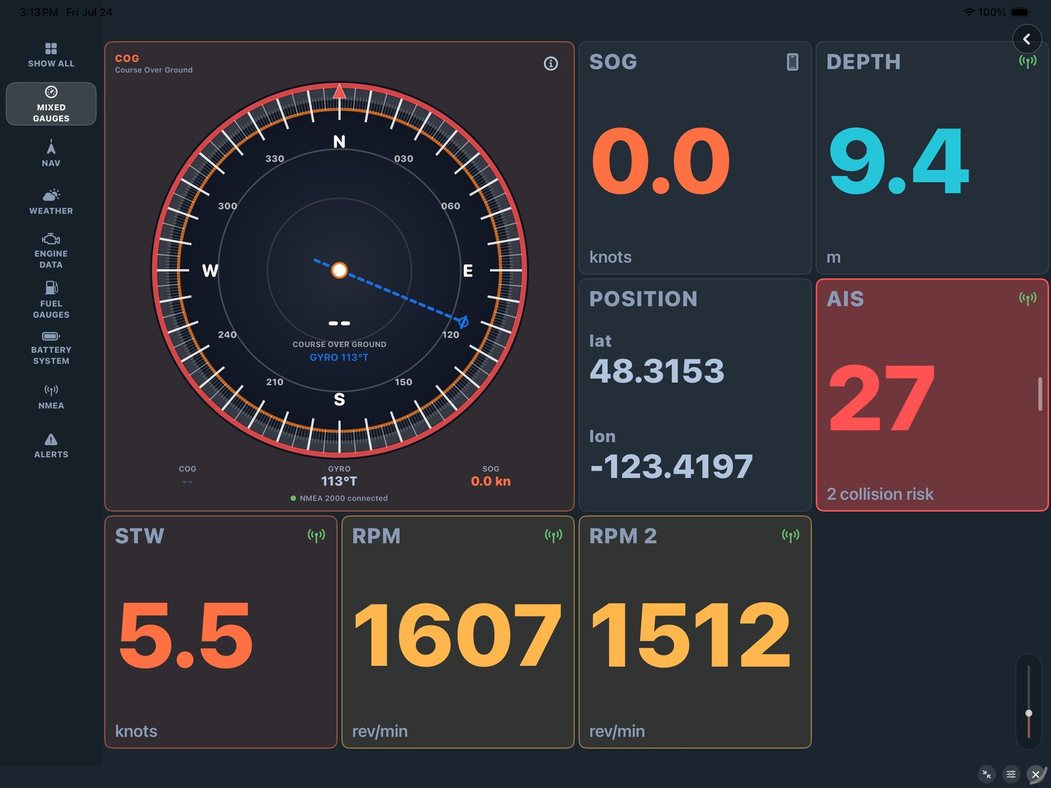
Walk any boat show and you'll see helm stations bristling with instruments — a display for speed, another for depth, a cluster for the engine, wind at the masthead reading out somewhere near the compass. It works, but it's a layout assembled by whichever gear got installed when, in whatever space was free. You adapt to it. You learn where to look.
SeaVectors flips that around. The instruments come to one screen, and you arrange them — by what you watch most, not by where a bracket happened to fit.
The 30-day free trial includes the complete experience, so you can build a dashboard around the instruments and information you actually use before deciding whether to subscribe.
- Download SeaVectors on the App Store
- Get SeaVectors on Google Play
- Not ready to install? Open the lightweight web chart for a quick preview.
Your data, on your chart
The instrument panel sits over the chart, always showing the numbers that matter: speed and course over ground, charted depth, position, route ETA, cross‑track error. Alongside them, live wind, current, and wave data read from the forecast at your exact position. And when you connect your boat's own network — more on that in a moment — every gauge from those instruments joins the panel too.
Tap the panel and it opens into a full‑screen dashboard, organized by category. This is the view that replaces a helm full of separate displays: navigation data, environment, and everything coming off your boat, in one place, laid out to be read at a glance.
Arranged the way you read
The layout is yours. Drag a widget to move it. Resize the ones you watch constantly so they're bigger and read from across the cockpit. Prune the ones you don't need and add them back whenever you like. The grid reflows around whatever set and order you choose, and it remembers — your layout is there next time you cast off.
There are around two dozen widgets to draw from, covering navigation, environment, vessel and engine data, AIS, and safety alerts. Most people run a handful they truly watch and keep the rest a tap away. The point isn't to show everything at once; it's to put your critical few front and center.
Each gauge tells you where it's from
A number is only as good as your trust in it, so every tile shows its source and its latest reading. That matters more than it sounds. When your depth gauge is reading from your boat's echo sounder, you want to know that — versus the chart's charted depth, which is a different thing entirely. When you've got two engines, you want to be sure the RPM you're watching belongs to the engine you think it does.
That last point is where SeaVectors gets genuinely capable. Connected over your boat's network, it's instance‑aware: two engines each get their own gauge, the house and starter batteries read separately, each fuel and water tank shows its own level. Nothing gets averaged into a single vague number. Tanks and batteries even show a short level trace, so you can watch a tank drawing down or a battery recovering, not just its instantaneous value.
Where the numbers come from
Some widgets fill themselves. Speed, course, and position come from GPS the moment you have a fix. Wind, wave, current, and air temperature come from the weather forecast sampled at your position — so even without a wind instrument, the panel has something real to show.
The engine, fuel, tank, and battery gauges come from your boat, over WiFi, using the industry‑standard NMEA 0183 and 2000 protocols. Connect a gateway and those tiles light up the moment data starts flowing. If a gauge sits empty, that's usually the honest answer that its data isn't on your network yet — and it's the cue to set up the connection.
Why it matters
A glass cockpit used to mean a five‑figure refit. SeaVectors gives you the important part of it — one screen, your data, your layout — on the device already in your pocket, over your existing instruments, laid on top of an official ENC chart.
Set it up once for the way you actually boat: the four or five gauges you live by up top, the rest a tap away, each one telling you where it's from. Then it's just there, every trip, reading the way you think.
Start your 30‑day free trial on the App Store. Learn the details in The Instrument Panel, and connect your boat with our NMEA Gateway Guide (NMEA 2000 & 0183).