
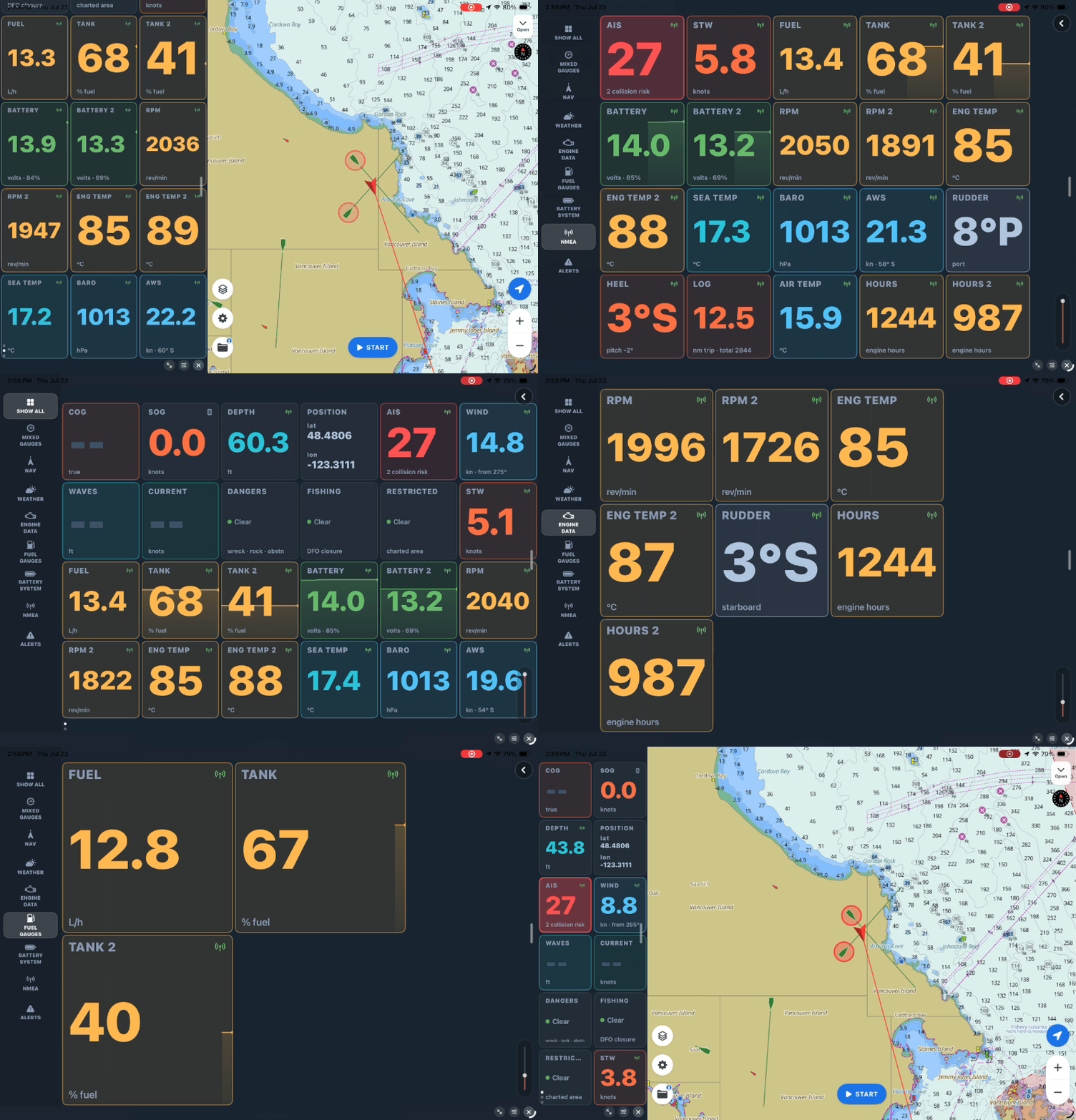
Your boat already knows a lot about itself. The depth sounder knows the water under the keel, the log knows your speed through it, the masthead knows the wind, and if you've got engine sensors, they know RPM, temperature, and fuel. All of that data is usually trapped on the instruments that measure it. The good news: getting it onto your phone is easier than most people expect.
SeaVectors reads your boat's data over WiFi using the same standards the marine industry has used for decades — NMEA 0183 and NMEA 2000. No proprietary app, no cable to your phone. Here's how it actually works, in plain terms.
The 30-day free trial includes the complete experience, so you can test SeaVectors with your own gateway, instruments, and familiar waters before deciding whether to subscribe.
- Download SeaVectors on the App Store
- Get SeaVectors on Google Play
- Not ready to install? Open the lightweight web chart for a quick preview.
The one piece you need: a gateway
Your instruments talk to each other over a wired network — an NMEA 2000 backbone, or older 0183 wiring. To get that onto WiFi, you need a small device called a gateway that bridges the boat's network to a wireless one your phone can join.
Some boats already have this. Many AIS transponders include WiFi. Navico‑family plotters — B&G, Simrad, Lowrance — can serve their data over WiFi directly. If you don't have any of those, a dedicated WiFi gateway from Yacht Devices, Digital Yacht, Actisense, ShipModul, or Quark‑elec does exactly this job and nothing else. There's a full supported‑device list built right into SeaVectors.
One honest note that saves a lot of frustration: Garmin, Raymarine, Furuno, and Humminbird plotters keep their WiFi to themselves — it talks only to their own apps. That's not a SeaVectors limitation; it's how those systems are built. The fix is simple and it's better anyway: add one of the gateways above to your NMEA 2000 backbone. It hears every sensor on the network directly, and your plotter's cooperation isn't required.
NMEA setup resources
Connect with the right settings
Use the setup guide for connection steps, then confirm your gateway, plotter, or AIS device in the compatibility reference.
Connecting, step by simple step
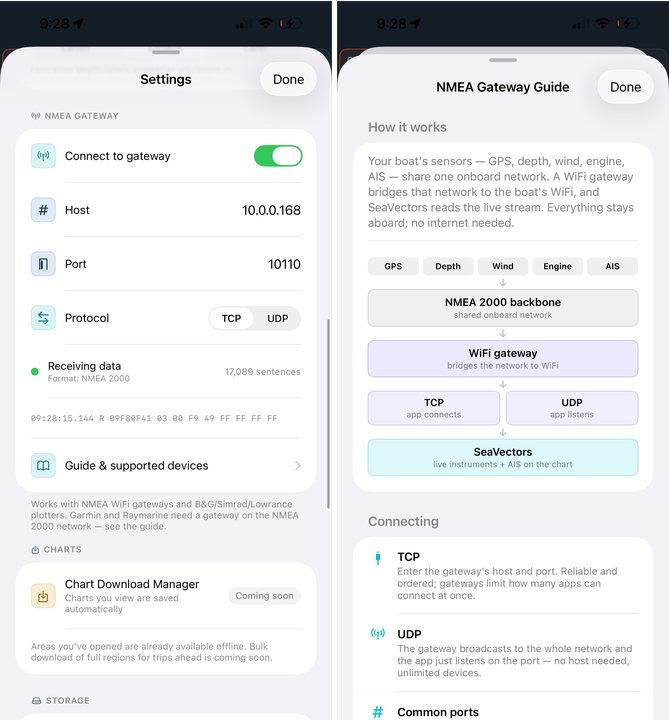
Once a gateway is on the network, connecting takes a minute:
- Join your phone to the boat's WiFi — the gateway's network.
- In SeaVectors, open Settings → NMEA Gateway and switch it on.
- Choose TCP or UDP (your gateway's manual says which), enter the address and port, and you're done.
Then watch the status dot. Red is disconnected, orange is connecting, yellow means you're connected and waiting, and green means data is flowing. When it goes green, SeaVectors figures out the format on its own — 0183, 2000, or both — and shows a running count of sentences plus the raw last message, so you have live proof the boat is talking.
If you're not sure which protocol to use, start with UDP where your gateway offers it — there's no address to get wrong, just a port to listen on. TCP is rock‑solid too; it just wants the gateway's IP and port.
What lights up
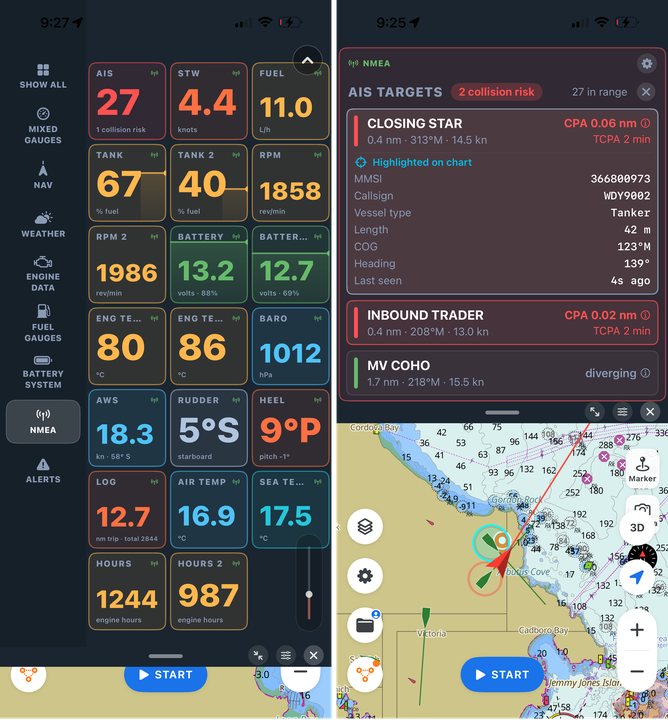
The moment data flows, your instrument panel comes alive. Position, course, and speed over ground. Real depth from your sounder and speed through the water from your log. True and apparent wind, water and air temperature, barometric pressure with its trend. And if your engine and tanks are on the network: RPM, engine temperature and hours, fuel rate, tank levels, battery voltage.
Because NMEA 2000 carries instance information, SeaVectors keeps your two engines, your house and starter batteries, and each tank as separate gauges — not blurred into one figure. That's the kind of detail a proper gateway unlocks, and it's the difference between "engine temperature" and "port engine temperature."
It all stays on the boat
Worth saying plainly: this connection is entirely local. There's no cloud, no account, no internet required. Your boat's WiFi password is the only key, and everything stays on the network between your instruments and your phone. It works just as well fifty miles offshore as it does at the dock.
Why it matters
Connecting your boat to SeaVectors is the step that turns it from an excellent chart into a full navigation station. The chart shows you where you are; your instruments tell you what your boat and the water are doing; and now they're on one screen, over official ENC data, arranged the way you like.
It's a one‑time setup — a gateway, a WiFi join, a couple of settings — and then every trip you cast off with your whole boat reporting in. If you've been meaning to do it, the trial is the time.
Start your 30‑day free trial on the App Store. For the connection walkthrough and the full device list, see our NMEA Gateway Guide (NMEA 2000 & 0183); to arrange the gauges, see the Instrument Panel guide.